
A GNOME Shell extension that displays real-time, word-synced Spotify lyrics directly in your desktop panel — so you never have to leave what you're doing to follow along.
▶ Click to watch YouTube demonstration
| Feature | Description |
|---|---|
| Synced Lyrics | Line-by-line lyrics update in real time as your music plays, powered by LRCLIB |
| Panel Placement | Position lyrics on the left, center, or right side of the GNOME top bar, with configurable order index |
| Customizable Look | Adjust max text width, font size, and toggle the music icon on or off |
| Smart Hiding | Optionally hide the text when Spotify is paused |
| Title Fallback | Shows Artist — Title when no synced lyrics are available |
| Lyrics Offset | Fine-tune timing (±2 s) so lyrics match your audio perfectly |
| Secure Auth | OAuth 2.0 PKCE flow with refresh tokens stored in GNOME Keyring — no password ever touches disk |
| Lightweight | Smooth 200 ms UI refresh with configurable API poll interval (3–10 s) |

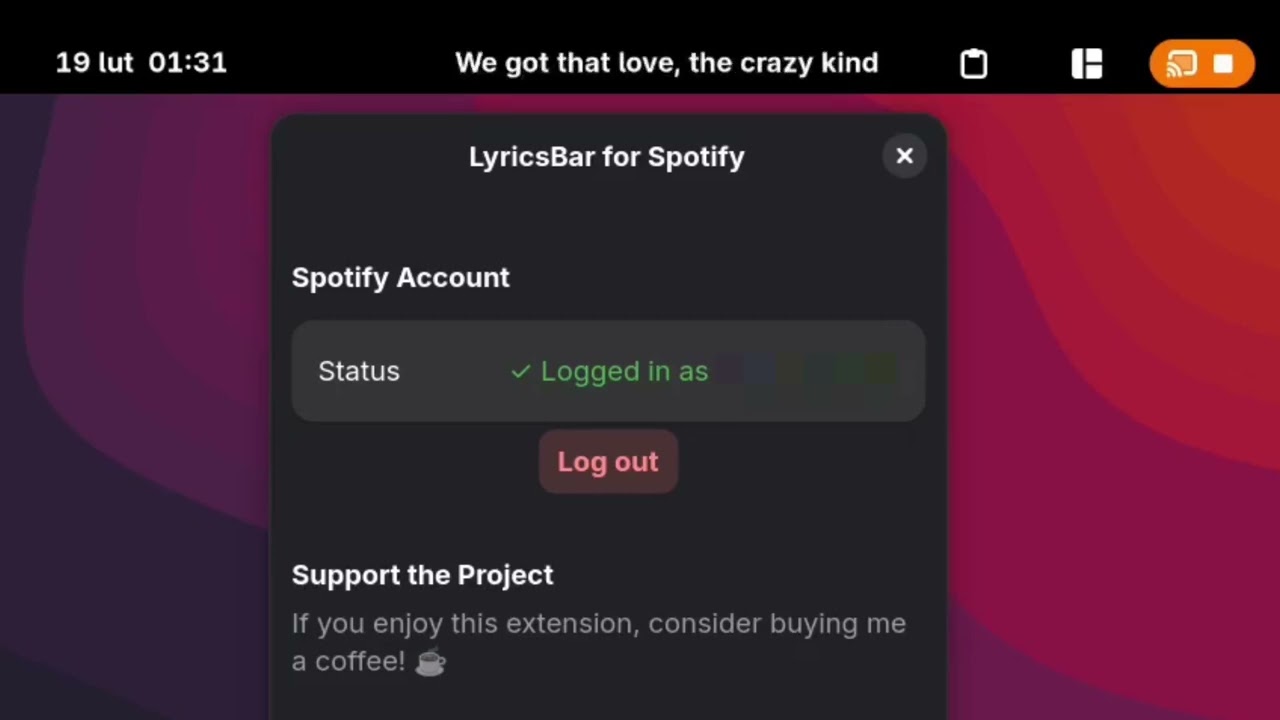
The settings window has three tabs:
- Account — log in/out of Spotify and support the project
- Appearance — control where and how lyrics appear in the panel
- Behavior — configure playback sync, offset, and hide-when-paused

When you click Log in to Spotify, your browser opens the official Spotify authorization page. Spotify asks you to confirm the permissions the extension needs (read your currently playing track). After clicking Agree, you are redirected back and the extension connects automatically — no password ever leaves Spotify's servers.
Warning
- This extension has only been tested on CachyOS with GNOME 49. Compatibility with other distributions or older GNOME versions is not guaranteed.
- Lyrics that do not have active synchronization data in the LRCLIB database will not display properly.
- GNOME Shell 49
- Spotify Premium account (required by the Spotify Web API for playback state)
- Active internet connection
Note
GNOME Extensions Store listing is coming soon! For now, install manually:
git clone https://github.com/Jachu7/LyricsBar.git
cd LyricsBar
mkdir -p ~/.local/share/gnome-shell/extensions/lyricsbar@Jachu7.github.io
cp -r * ~/.local/share/gnome-shell/extensions/lyricsbar@Jachu7.github.io/
Then restart GNOME Shell:
- Wayland — log out and back in
- X11 — press Alt+F2, type
r, press Enter
Enable the extension:
gnome-extensions enable lyricsbar@Jachu7.github.ioOpen the settings via Extensions app or:
gnome-extensions prefs lyricsbar@Jachu7.github.io- Open the extension preferences and go to the Account tab.
- Click the Log in to Spotify button.
- Your default browser will open and take you to the official Spotify authorization page (
accounts.spotify.com). This is Spotify's own website — the extension never sees your password. - Review the requested permissions (read your playback state) and click Agree.
- Spotify redirects your browser to a local callback URL. The extension captures it, exchanges the code for an access token in the background, and stores it securely in the GNOME Keyring.
- The status in the Account tab will change from Not logged in to your Spotify username — you're ready!
Note
You can log out at any time by clicking Log out in the Account tab. This removes the stored token from the keyring.
- Side of Panel — Left / Center / Right
- Order in Panel — position index within the chosen section
- Max Text Width — 100–800 px
- Font Size — custom size or system default (0)
- Show Music Icon — toggle the ♪ icon
- Show Artist — Title — fallback when no synced lyrics are found
- Hide When Paused — clear the panel text when playback is paused
- Poll Interval — 3–10 seconds between Spotify API checks
- Lyrics Offset — shift lyrics timing by −2.0 to +2.0 seconds
lyricsbar@Jachu7.github.io/
├── extension.js        # Main extension lifecycle & polling loop
├── prefs.js            # Preferences window (Adw/Gtk4)
├── metadata.json       # Extension metadata
├── stylesheet.css      # Panel label styles
├── schemas/            # GSettings schema
└── src/
    ├── auth.js         # OAuth 2.0 PKCE flow + GNOME Keyring storage
    ├── spotify.js      # Spotify Web API client
    ├── lyrics.js       # LRCLIB lyrics fetcher & LRC parser
    └── ui.js           # Top-bar indicator widget
- Authentication uses the OAuth 2.0 Authorization Code with PKCE flow — no client secret is needed.
- Refresh tokens are stored exclusively in the GNOME Keyring (via
libsecret), never in plain text. - The extension only requests the
user-read-playback-stateanduser-read-currently-playingscopes — it cannot control playback or access your library. - Lyrics are fetched from the open LRCLIB API; no personal data is sent.
Contributions, issues, and feature requests are welcome! Feel free to open an issue or submit a pull request.
If you enjoy LyricsBar, consider supporting the project:


Made with ❤️ for the GNOME community